Quantities in passing
Just type 3 apples or 2x milk. The number shows as its own field behind the item.
Type items with quantities, tick them off grouped by shop, share the list with someone. The app runs on your own web space – no ads, no account and nobody reading along with what you buy.
Version 1.8 · ZIP, about 570 KB · needs PHP 7.4 and HTTPS
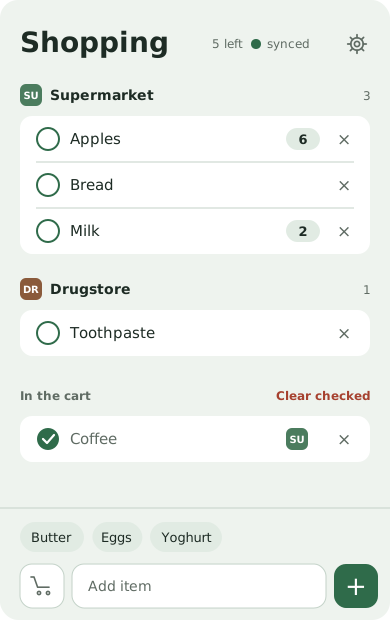
Deliberately few features, but the right ones.
Just type 3 apples or 2x milk. The number shows as its own field behind the item.
Add your shops with their own icon. The list groups itself, in the order of your shopping round.
What you buy often comes first. Most items land on the list with a single tap.
Starts without a signal, keeps saving locally and sends everything once you are back online.
Before every change the server sets the previous state aside. Restoring takes one tap.
The server merges changes entry by entry, so if you both add something at the same time, both entries stay.
English, German, Dutch, French, Italian and Spanish, plus light and dark mode.
You need web space with HTTPS and PHP 7.4 or newer. Without sync, uploading a single file is enough.
The ZIP holds a folder called shopping-list with everything you need.
The key protects your list. Put it into config.php – or have it generated here.
By FTP to your web space. Make sure PHP may write into the data subfolder.
Open the address on your phone, add it to the home screen in Safari or Chrome, enter the key. Done.
The long version: the manual walks through every step with check commands, explains the sync and has a troubleshooting table. Manual as PDF
Strict security headers? If your site sends a Content-Security-Policy,
upload the .htaccess that ships inside the app folder. Otherwise the page stays blank.
Enter the address where the app will live, for example
https://example.com/shopping-list/
The key is created in your browser and never transmitted. Every click makes a new one.
If you prefer the terminal: openssl rand -hex 24 gives you the same thing.
Open the setup link once on each device and the key is stored there. Only send it over a secure channel such as a messenger, because it contains the key in plain text.
Everything in one ZIP: the app, the PHP script, both manuals and the licence.
Specific version: Download v1.8
For the sync yes, and plain web space with PHP is enough. Without sync, uploading the single HTML file is all it takes, and the list stays on one device.
No, and that is on purpose. You add it to the home screen from the browser, after which it behaves like a normal app – no store, no account.
Yes. Everyone enters the same key and works on the same list. The server merges changes entry by entry, so both entries stay when you add things at the same time – even when one of you was offline in the shop. Only when two people change the very same item at the same moment does the later change win.
It stays with you. The app loads no external fonts, scripts or trackers and talks to your own server only.